Capture with context
Bring enquiries into the CRM with the service, source and details your team needs to respond well.

NextVision Studio · Dublin & North Dublin
An enquiry is easier to follow up when the information is in one place. I help you organise your pipeline, connect your forms and reduce repetitive admin with practical automation.
Tell me what you need. I’ll reply with a clear next step and what to include in your quote.
CRM and AI Automation
The work depends on your existing systems, the data to move, the number of pipelines and the integrations you need. A straightforward website-form connection is different from migrating records and connecting several channels. We separate setup work, software subscriptions and any ongoing support in the proposal.
A CRM keeps the contact, enquiry, sales stage and next action together. The useful starting point is the way your team handles a real enquiry, rather than a long list of software features. NextVision Studio helps businesses in Dublin connect website forms, organise pipelines and automate repeatable steps.
Agree which sources enter the CRM, who owns each enquiry and what information must be carried across. A contact in an inbox is not automatically the same thing as an opportunity in the sales pipeline.
Decide which actions stay manual and which can become reminders or notifications. Customer-facing email or WhatsApp automation needs appropriate permissions and approved content before it is enabled.
Check an agreed test enquiry from the original form through to its contact, opportunity, service and source. Confirm duplicate handling, team access and the next action before relying on the connection.
Describe one enquiry from arrival to outcome: where it comes in, who responds and where information gets lost. Share the tools already in use and who manages them. We can improve one connection first rather than replace every system at once.
When website forms, calls and ad enquiries live in separate places, it is easy to lose context or leave a promising lead waiting. A practical CRM setup gives your team one place to see the enquiry, its source, its status and the next action.
We map the real process first, then configure the pipeline and automations to fit it. AI can be considered for specific tasks, but it is not added just for the label.
Bring enquiries into the CRM with the service, source and details your team needs to respond well.
Track each opportunity through clear stages such as new, contacted, won or lost, and keep the follow-up visible.
Set up practical tasks, notifications and follow-up workflows where your tools and customer permissions allow.
Keep the ad, landing page, form and lead record connected, so your team can see what came in and what needs to happen next.
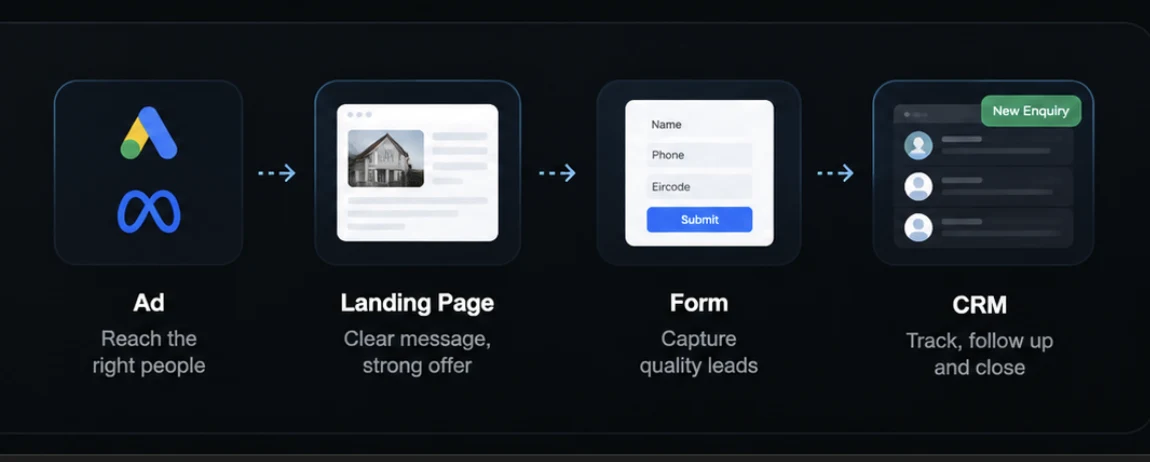
We review where enquiries come from, who responds and what should happen next.
Leads are organised into useful stages, with source and context available to the people following up.
Tasks, notifications and follow-up workflows can reduce manual hand-offs while keeping your team in control.
Integrations and AI features depend on your existing systems, access and the agreed scope. We confirm what is possible before implementation.
Depending on your setup, it can include enquiry capture, a clear pipeline, lead source tracking, assignment and next-step tasks, and configurable email or WhatsApp follow-up. We confirm integrations and exact scope before recommending changes.
No. Many useful improvements are straightforward CRM workflows. AI is considered only for tasks where it adds a clear, reviewable benefit; your team stays responsible for customer decisions and communication.
The first step is to review your current tools, lead sources and follow-up process. The recommended setup depends on what your existing CRM supports and which integrations are available.
Yes. NextVision Studio is based in Dublin and can plan CRM and lead workflow projects with businesses across Ireland remotely.